Does anyone know what these do anymore?

Spiny hard drives and analog clocks are pretty much anachronisms. So why not mash up the two? Actually, I was asked to come up with some items made from junk parts to assist the promotion of the Shore Foundation, where I volunteer each week. We have _a lot_ of old mechanical hard drives around, which usually get crushed and then sent on for further processing for resource recovery.

Here are examples of three slightly different conversions of hard drives into desk clocks.

There are a couple of videos out there of how other people have done it, so I will only provide details that I find have been left out of other projects.

There are a wide variety of inexpensive clock movements available. The critical differences (other than the style of the hands) are the shaft length and hands length. I suggest disassembling and drilling the hard drive first before purchasing the clock mechanism. I wanted to keep the hands within the circle of the drive platter so finding short enough hands took some effort. Likewise, measuring the length of shaft needed to keep the hands just above the laptop function keys made for a better looking final product.

The obvious place to run the clock shaft is through the mount hole for the platter bearings and motor. The bearing/motor assembly can be pretty easily knocked out of the case and the mount hole drilled out of the aluminum case to accommodate the clock shaft. I originally wanted to include the bearing assembly without the motor core in the final clock. However the bearings are made of hardened steel and sit in hardened steel races. A home-workshop-level drill press was not going to drill out those pieces. So in the end I removed the motor windings and used those over the bare case hole.

The hard disk platters are made of unbelievably polished aluminum. As soon as you pop the cover (you need Torx drivers in the T4-T6 range for the screws) the disk will never be truly clean again. In particular, the fumes from the drying super glue gel used to mount the laptop keys clouded up the disks. This required significant cleaning with 100% alcohol to remove. Any other cleaner left a residue.

Mounting the clock mechanism to the back of the hard drive case does not have an obvious solution. Sanding of both surfaces to roughen them up and then copious amounts of hot melt glue was the best solution I could find.

This is not a particularly difficult project with those things in mind.

Motherboard Monoliths

I’ve been steadily volunteering at the Shore Foundation, which refurbishes and recycles computers. One of my new assignments was to create something interesting to put in the lobby out of the raw materials at hand.

There are a lot of raw materials available in the warehouse, as long as you are willing to work with old and broken computer parts.

broken computers
The first suggestion was to build a motherboard wall–a large permanent installation of old motherboards. This can look cool, but it’s been done before, is very static, and requires many heavy mounting points on the chosen wall. While searching for additional inspiration in the warehouse I found some 7 foot tall sever racks slated for the recycling center. Using these as frames would allow for a more mobile solution and the C-shaped rails would make good mounting points for inward pointing LED strip lights (no point doing this without some blinky blinky).

Empty server racks

Filling each rack would require harvesting about 20 motherboards of various sizes and colors. Additionally, interesting heat sinks were added, even if not original, to create some vertical relief and reflective surfaces. The motherboards were installed with standoffs at different levels to vary the relief.

MotherboardsThe strip lights can be controlled with a remote to adjust the color. I’m hoping the animated sequences never get used. Two of these monoliths provide some color for the lobby, can be used as room partitions, are potential mounting surfaces sponsor recognition, and can relatively easily be transported to events.

finished monolith

Where does all that stuff go?

OK, I’m an old PC hoarder. Nothing like breathing new life into old hardware by taking someone’s cast off PC/Laptop and swapping in a solid state drive or some version of Linux. But at some point it’s got to go off to it’s final destination. And what if you are a large corporation that swaps out computers by the thousands? Now I am finding out what comes next.

I recently started volunteering on a regular basis at the Shore Foundation (https://www.theshorefoundation.com/), which takes computers going out of service at corporations and refurbishes them to pass on to small non-profits in our area. Any equipment not suitable for reuse is carefully dissembled and passed on for resource extraction and recycling by local partners Sunnking and Li-Cycle.

Basically, my home hoarding behavior has been enabled on an industrial scale.

I was going for “The Thinker” pose in this shot, but it turned out more like “Please adopt our computers and give them a good home” 🙂

Pile O’ Pi Picos

The Raspberry Pi Pico is an impressive new microcontroller board for the education market that I think will largely replace the Arduino. It’s cheap (starting at $4), easy to connect to (shows up as a usb drive), and easy to start with (download the current version of Thonny and you are ready to go). Its far more powerful than the Arduino and introduces people to Python rather than a version of C (although it can be programmed in C). And it came out of the gate with a solid introductory book suitable for all ages. Unlike the ESP8266/32 based boards the Pico does not have networking on board. However the convenience, utility, and support for learners with the Pico blows those boards away.  Plus it has a few trick features of its own.

I am currently assembling a number of Pico based kits to teach from at the Rochester Makerspace.

Pile of Picos


Experiments in Bioplastic

A number of sources have sprung up for making biodegradable plastic from non-fossil fuel materials. One of the more interesting ones is Materiom. I’ve started experimenting with some of these recipes.

The key ingredients in most of these are corn starch, agar agar (a seaweed extract), and sometimes gelatin (from animal parts). Glycerin (aka glycerol, glycerine) is often used as a plasticizer–adding more makes a more flexible plastic. It can come from a variety of sources. All of these things are basically edible and can be manipulated in the kitchen so making plastic with them at home is appealing (if you’re into that sort of thing).

Starting with Materiom’s very flexible and translucent simmered agar recipe. I’ve been cooking up some variations.

bioplastic experiments

My observations so far:

  • Agar is awesome. It dries very tough and is easy to vary the flexibility by varying the amount of glycerin used. It is highly water resistant while still being biodegradable–an hour submerged in cold water barely affects it. But it will degrade pretty quickly in boiling water. Unfortunately…
  • Ager is prohibitively expensive to use in quantity–roughly $40 a pound in pound/kilo quantities.
  • Corn starch is cheap at about $2 a pound but degrades quickly in cold water. It also swells during cooking into a thick goo that is pretty much impossible to pour. Too bad because its great for machining after fully dried.
  • Gelatin is basically dissolved cow bones and pig skin and I’m just not interested 🙂
  • Many recipes include the use of vinegar as a weak acid. But vinegar stinks! Don’t use it unless you want to be repelled by your final product. Use a little citric acid or even salt instead.  They will provide the free ions to give the reaction a kick without the smell.
  • Since all of these recipes use water the results will shrink, sometimes dramatically,  as they dry out. This makes them hard to cast or mold.

At the moment I am working with a 90% corn starch (for low cost) and 10% agar (for water resistance) mix, with as little water as possible and a pinch of citric acid. A bit of stirring and a quick trip to the microwave and the result is a puck of plastic that looks like it could actually be useful for something at a reasonable cost. I will post more if I figure out something that is more useful than an excuse for playing in the kitchen.

I Used to Make Movies

When desktop editing of digital video became accessible 20 years ago I started playing around with it. After a couple of years I started making short dramatic movies on video and showing them in local film festivals. I did everything behind the camera on these–writing, casting, directing, lighting, editing, etc. Occasionally I had some help with the sound. I liked the lighting and directing the actors the best. It was a lot of fun involving people with community theater experience (and the occasional family member) and showing each one to a live audience a few times. I consider them my student films, except I never graduated 🙂

They live on at Vimeo in (not so) glorious standard definition if you want to check them out.

Cyberdeck Inspired Raspberry Pi Center

So there is somewhat of a tradition of repurposing old portable computers into “cyberdecks” with modern guts. Sounds like fun but I have a practical use for something like this that needs a bigger foundation than the usual C64 or TRS-80.

I have some Raspberry Pi projects coming up and I always find a pain to go hunt down a power supply, a reasonably sized monitor, keyboard, mouse, and connectivity to work with a Pi. So my interpretation of the cyberdeck needs to be big enough to be usable as a Pi programmer with all that stuff included and room to store the Pi as well.

So the time came to put on my tie and suspenders and get all 80’s business dude to buy one of these things off ebay:

It weighs about 10lbs, features a blue text screen on a slightly lighter blue background, and runs everything, including two 3.5″ floppy drives off a tiny lead acid battery.

The one I got arrived in complete but pleasantly worn condition. My favorite part is the faint outlines of a “Buffalo Public Schools” sticker on the lid. And that the graphics and ribbed features reminded me of something from Silent Running. Just look at all those pins on the ports! USB saved us from a lot.

This is a peek at the original insides. A lot of discrete components everywhere and one little 7 mhz 8 bit processor in there somewhere. What a deal for $1700 in 1987 money.

It supposedly worked but I didn’t bother to turn it on before I had it gutted and started mocking up parts. My plan was to keep the external appearance and keyboard and get rid of everything else so I could fit it out with modern tech and storage.

I’m close to being finished with this project and I will do a more complete write-up. The biggest challenge has been the case material. It’s a thick, brittle plastic with conductive silver paint on the inside and a glued conductive foil on the outside with gray paint on top that just wants to jump off. What a nightmare to work with!

MakerX 2020 is On Its Way!

MakerX The Columbus Maker Expo will happen February 29th from 10am to 4pm in the Lausche building  of the Ohio Expo Center.

I am thrilled that this event has grown and matured each year and especially that we will be able to make it free for this first time. More details at

www.makerx.org

MakerX is a festival of creating with technology that I am proud to have led the development of over the past three years. It brings together makers and inventors of all ages and capabilities as peers to share the work they do with the public for a day. This year we are expecting more than 70 exhibitors and about 1500 people in attendance.

Can you build a better soldering aid?

Here is design/prototype challenge I presented to a recent pop-up makerspace. I have been working on my own solution (which I have no intention to develop commercially so I will provide full details  after more testing) but I am interested in other ideas.

“Helping hands” or “third hands” are tools designed to aid in electronics soldering but are also used in jewelry-making and other projects using small parts.

The traditional helping hands tool sells for $5-$10 and is almost universally used.

Limitations:

  1. Only two hands when you often need 3 or more.
  2. The serrated teeth on the clips cut through insulation on wires (potentially causing shorts) and are not gentle on other parts.
  3. The wing nuts easily loosen.
  4. The joint system does not provide enough flexibility.
  5. The magnifying glass is not really useful and gets in the way.
  6. The base is too small and the tool falls over easily.

Basically, they suck, but everyone still buys them.

Current alternatives use goose neck or machine coolant hoses to provide more flexibility and have 4 or 5 hands on a larger, more stable base.

Limitations:

  1. These alternatives sell for $25-$40.
  2. They still use clips with serrated teeth that cut through wiring. Some have plastic covers on the clips that promptly melt and then wear through.
  3. More flexibility but can’t bend in a tight radius.
  4. They are overly large for many projects and get in the way of soldering irons, etc.

Project Challenge

Design, prototype, and build an alternative to the traditional tool that:

  1. Has smooth jaws on the clips.
  2. Has at least three hands.
  3. Is maximally adjustable.
  4. Is stable but as small and unobtrusive as possible.
  5. Can be made for less than $5 in materials in small batches.
  6. Is easy to manufacture.

Please send links to better alternatives to me at bill@tinkerfarm.net and I will add them to this post.

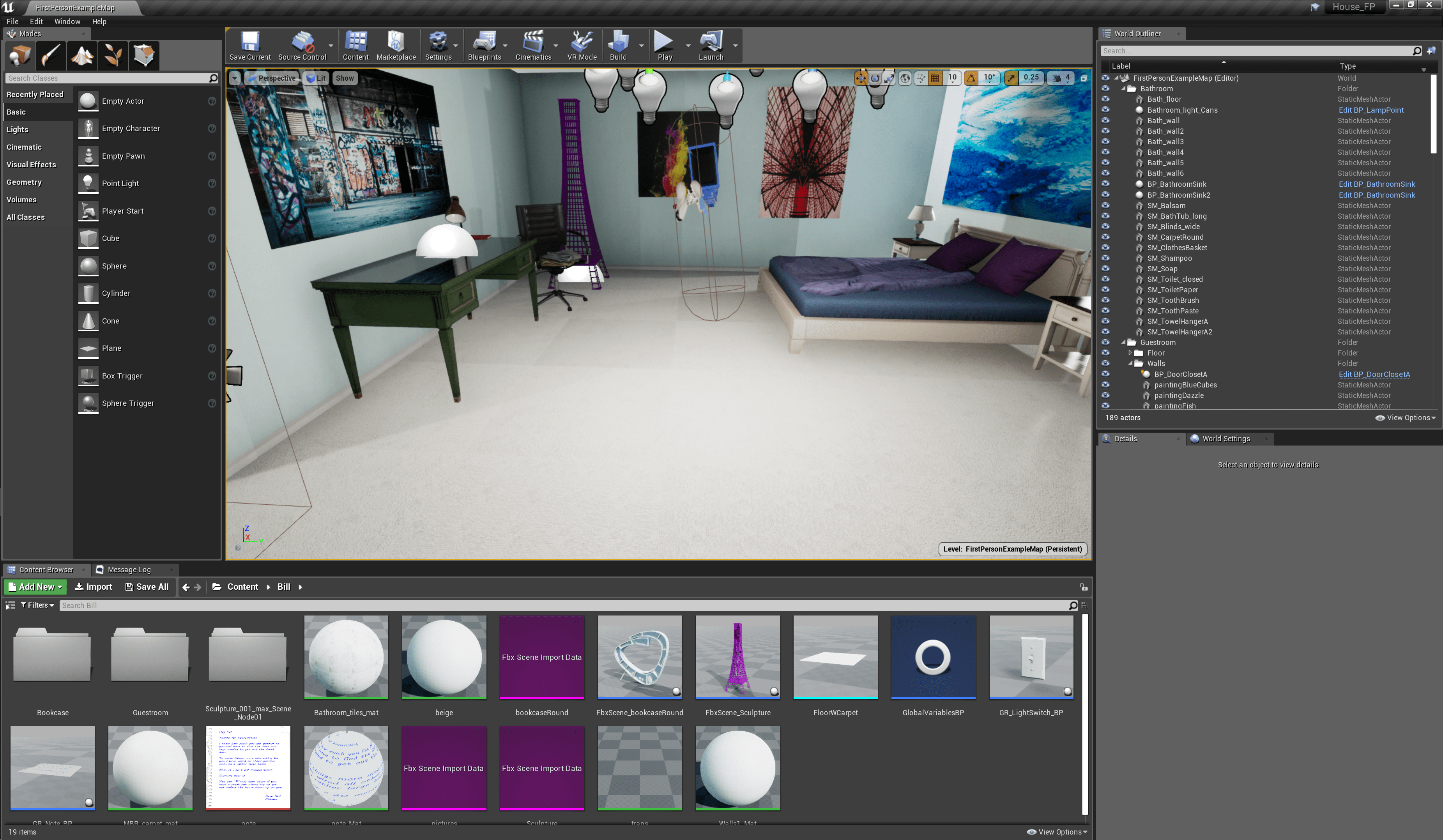
The Unity vs. Unreal debate: where to start?

Unity and Unreal Engine dominate the marketplace for people getting started in game and VR development. So the perennial question is which one should I learn? Having spent some time in both, I will share my views.

I am by no means a professional game developer. After over a year learning Unity and making some small 3D/AR/VR experiences in it, I mentored a group of college students in a studio course on it. Seeing their struggles with it, I spent a couple of months learning Unreal  and making one 3D experience it.

The short version is that in my opinion (as of fall 2019)   Unreal is better overall as a more focused and higher quality product but Unity is probably the best place to start given its deep and broad support for new users–but with serious qualifications.

Unity’s biggest strength is the breadth of support for new and varied usersThere are a vast array of online tutorials for Unity (although most of them are now out of date). The official tutorials and sample projects form a large collection and recently have been greatly enhanced with beginner material for users as young as middle school.  Unity supports 2D games which Unreal really doesn’t and I have found that many newbies want to start in 2D. Unreal has a limited selection of high quality official tutorials for new users.

The interfaces have some surface similarity but are quite different beyond first impressions. By comparison Unreal is simple, logical, and uncluttered. Once you have familiarized yourself with it, things are were you expect them to be and many features you have to set up in Unity just work out of the box in Unreal (such as editing in VR). Unreal content looks much better out of the box without the need to wade into tweaking advanced shaders and HDR pipelines. Unity has many, many windows, menus and layers and they keep changing with new versions or with new assets that bring their own menu additions with them. A big part of the learning struggle with Unity is discovering which feature is accessed through which menu. Frankly it’s a big cluttered mess compared to Unreal.

The Unreal interface is clean and simple.
The Unity interface contains many layers of windows, menus, and options that get extended with new assets and versions.

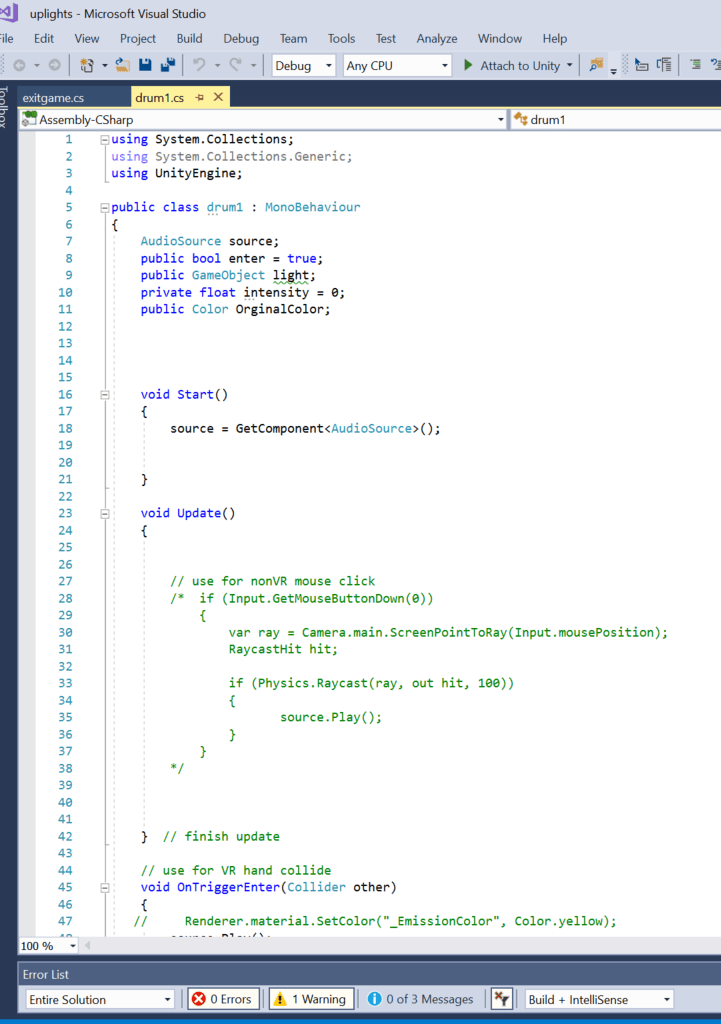
The two take different approaches to scripting. Unity is more conventional with text scripts done in C#. Visual Studio is now the primary IDE for editing scripts. This makes grabbing and sharing code with other people extremely easy. Unreal starts you off in visual scripting with Blueprints. Unreal expects professional teams to prototype in Blueprints and then tweak in C++ but here I am just focusing on learners and hobbyists. I am not a particular fan of visual scripting approaches but they do work better for some people. Blueprints offer a visualization of script logic flow which is much more helpful for debugging that warnings in a text console. But Blueprints are very hard to share and you are lucky if someone posted a screen capture of their Blueprint when looking for help online. I have found that I could get my own scripts working faster in Blueprints/Unreal but had substantially less recourse for outside help if I could not solve my own problems.

Unity scripting is text-based c# that can be easily cut and pasted.
Unreal scripting starts with Blueprints, which are visual and hard to share.

There is a huge difference in access to assets for a project. The Unity Asset Store is vast and has a large collection of free and low cost assets. as well as high quality and expensive ones However many of these are constantly going obsolete since Unity is pretty ruthless about breaking old content with new versions of the software. For example, I was bedeviled by a simple collection of “free rocks” trying to keep a Unity project alive through several minor version upgrades (which are frequent).  Coming from the Unity Asset Store the content in Unreal Marketplace initially seems shockingly small and expensive. However the free collections are very high quality, very complete, and they just work when you drop them into you project (in my very limited experience with Unreal). Unreal also makes a selection of paid asset free each month so it is possible to amass quite a library over time without spending much.

Unreal has fewer assets available but they seem to be high quality and highly compatible.
Unity has lots of free assets available although the quality and compatibility varies widely

Overall, Unreal is a more focused and higher quality product for creating basic 3D & VR work. It even has autosave (which Unity doesn’t) and I have yet to have it crash (which Unity does). Pause to think about that–no autosave and random crashes. Yes you can lose a lot of work if you are not careful in Unity.

If you know you want to develop something similar to what you see in the Unreal Marketplace (i.e. realistic looking 3D & VR content) then go for Unreal and save yourself a lot of chaos by trying to learn Unity. Yet for the newbie who just wants to explore the greatest range of options Unity is much more broadly supported (if more unevenly) and can produce a wider variety of content. Just manually save your work frequently and realize you will be led down a lot of dead-ends.

At this point I could go either way in future personal projects and teaching. For teaching beginners  I would probably go with Unity mostly due to their new beginner content & projects.


Workshops on “the stick”

I will be giving public workshops on this cool new Arduino-compatible prototyping device at Fuse Factory on September 4 and Idea Foundry on October 3rd.

The workshop features the M5StickC prototyping device from M5Stack. The “stick” is a compact Arduino programmable device that contains its own screen, battery power, and extendable sensors. It also provides full Bluetooth and wifi capability. Workshop students will learn the basics of programming the stick to add interactive display, light, motion, sound, and connectivity to their projects and prototypes. Each student in the workshop will receive a M5StickC kit to work with and take home. sign ups: 

http://thefusefactory.org/events/beyond-the-arduino/

https://app.getoccasion.com/p/n/swStXnZZ#

Pop up Innovation Station

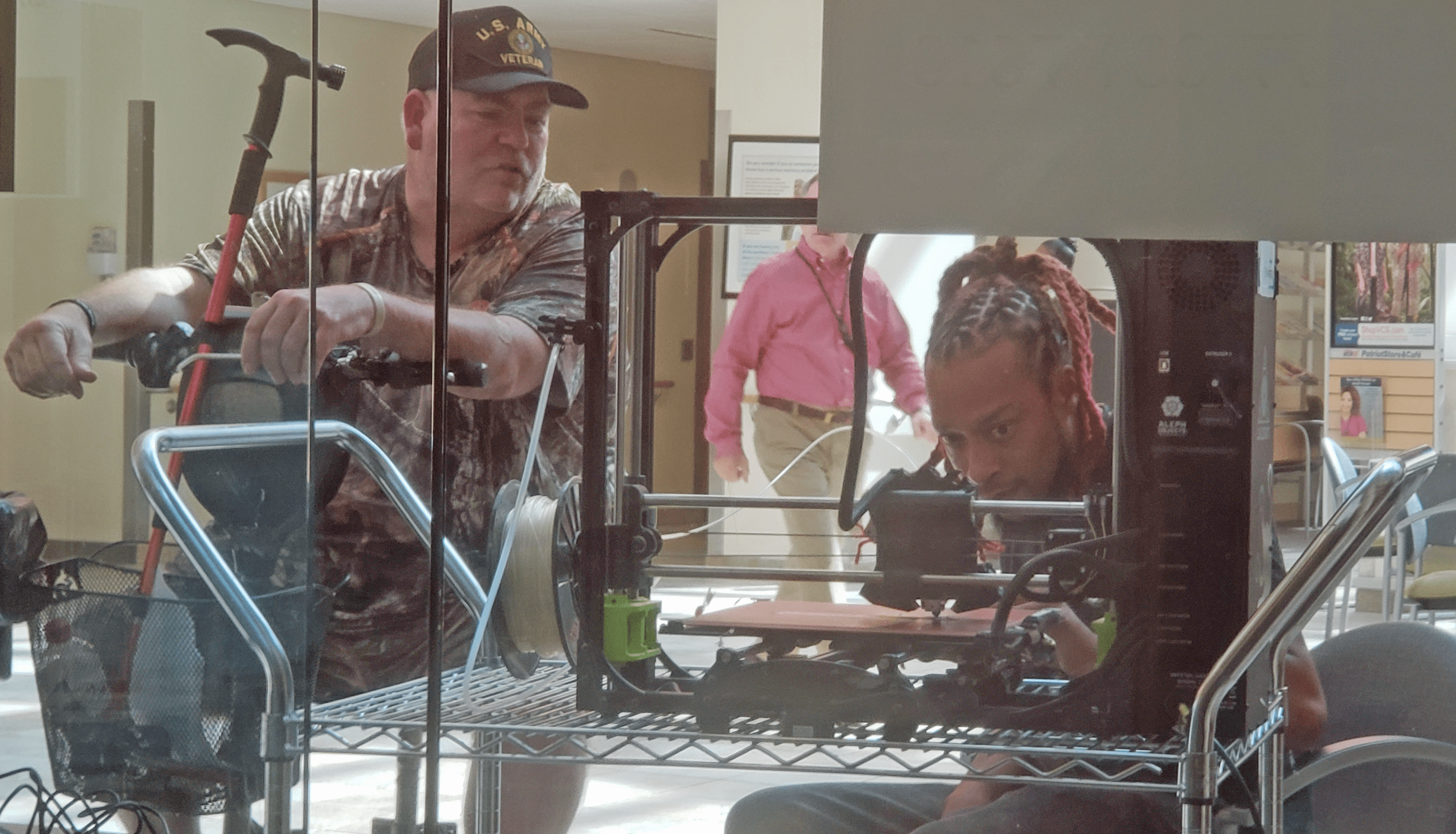
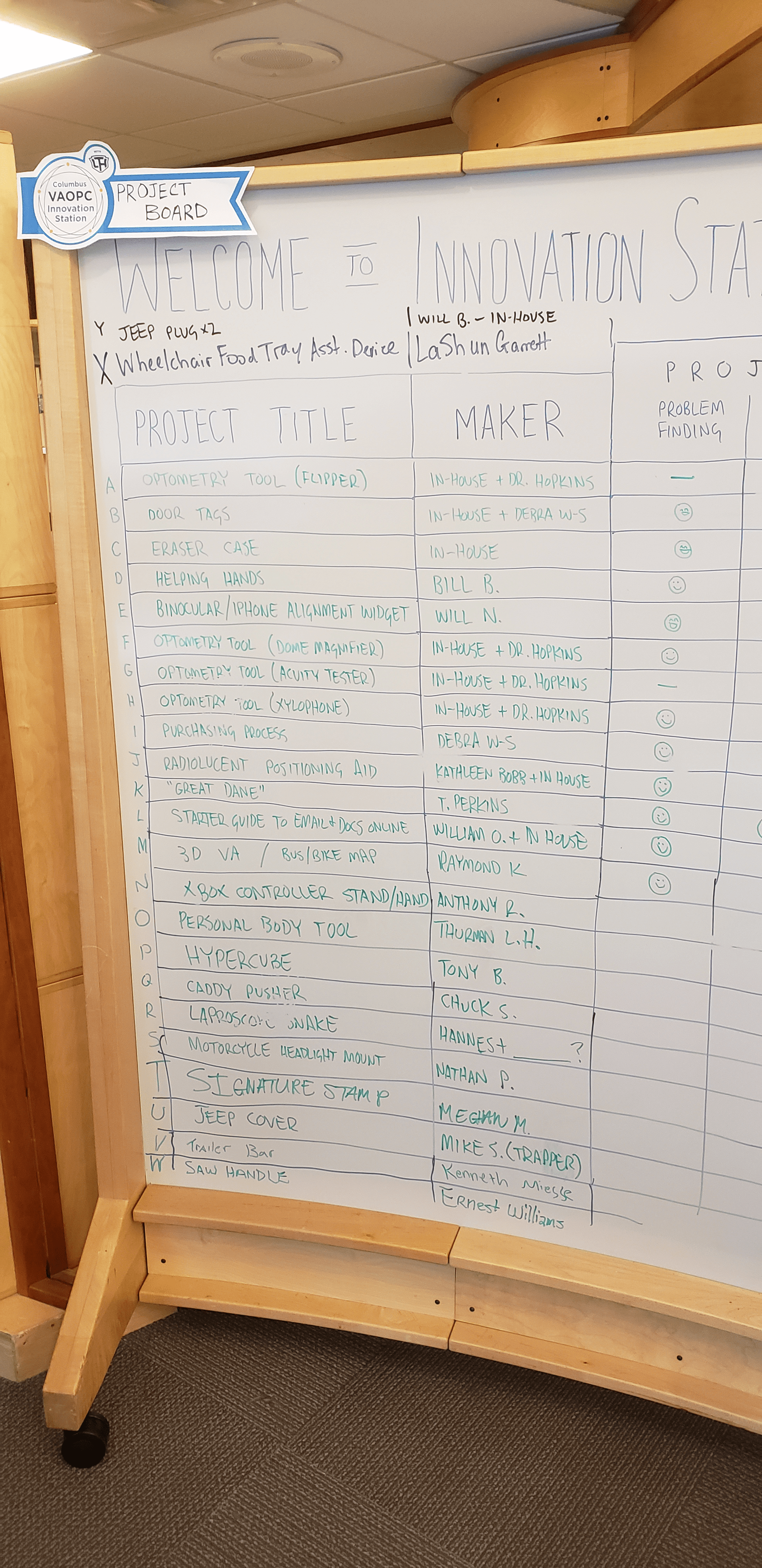
I have had a great opportunity to help with a pop up maker space, the “Innovation Station” at our local VA center.

The space is open for one month only but it has given  exposure to making opportunities to a new audience who are full of ideas and life experiences. The project board quickly filled after opening with problems presented by both patients and staff of the center. Significant progress was made on moving a number of these projects into a prototyping phase.

A number of workshops were held in  addition to many one-on-one conversations and mentoring sessions. Innovation Station has been a great success thanks to the VA center, Local Tech Heros and a substantial group of volunteers


Accessories for the “stick”

As I prepare to start teaching with the M5StickC I am collecting a testing hardware accessories. I’ve just gone through a small pile produced by Seeed Studio that use their Grove connector, also found on the stick. Next up will be a bunch of more commodity sensors and actuators commonly used with Arduinos. My notes on this research can be found here.

A pile of Seeed studio grove boards to test on the stick.

Unity projects for learning game audio

Capital University has a great Music Technology program (https://www.capital.edu/music-technology/) and I have collaborated with its director, Chad Loughrige, on a number of projects. One area we have collaborated on is developing simple video game environments for the students of his Audio for Media class to add all the sounds and music to.

I have created two basic first-person-non-shooter game environments in Unity for Chad’s students to work on. These environments used free and low cost assets from the Unity store along with custom coding and other tweeks. They are not full games, rather they are short experiences with 20+ opportunities to add sound effects and music.

The first project, “Chadland” had the player running around and collecting obvious targets.
Chadland had lots of gratuitous opportunities for sounds like breaking glass, knocking over fences and kicking boxes.

Chad and I led the students through a quick tutorial on Unity using these games and then he took them deeper into the FMOD middleware package (https://www.fmod.com/), where they could implement sophisticated looping and zoned music and triggered spatial audio effects.

The second project, “Elysium” was a somewhat more sophisticated escape game.
Elysium featured zombies that chased you down in a basic AI system.

Although these are more “A” (if that) than “AAA” games, they have provided a platform for the students to dive in on and quickly start using professional tools the audio side.

As of the summer of 2019 I am developing new projects in Unreal. I’ll cover the reasons for the platform switch in a subsequent post. Meanwhile Chad and his collaborators are expanding the opportunities for Music Technology majors to do work on audio for gaming and VR.

MakerX 2019 a Big Success!

MakerX The Columbus Maker Expo is an annual festival celebrating creating with technology. I lead the development and planning of MakerX.

We held our second annual MakerX at the Ohio Expo Center (aka State Fairgrounds) on April 6, 2019. Over 90 exhibitors participated and we had 1300 people in attendance (a big bump up from 2018).

Full information on MakerX is available at:  http://makerx.org/

Planning for MakerX 2020 is underway and announcements will be made on the website in Fall 2019.


New Maker Space going in at Capital

I’m now a Scholar in Residence at Capital University in the Columbus, Ohio area and just couldn’t resist the urge to establish a new maker space–or as I prefer to call it–a prototyping lab. We are still in the very early days here with only one room, a couple 3D printers, and some scrounged computers and furniture. Still, we already have a number of students coming in and doing cool projects. Next up will be outfitting the electronics bench and then we will see where things lead…..


MakerX The Columbus Maker Expo!

MakerX The Columbus Maker Expo will take place on April 21, 2018. Full details, including the call for exhibitors and venue information, can be found at:

www.makerx.org

MakerX is an independent maker festival that consists of a celebration, learning, and networking event for everyone in interested in the exciting new technologies of digital design and fabrication.

We are now accepting proposals to exhibit at MakerX!

We are seeking exhibitors who are: makers, inventors, tinkerers, teachers, clubs, meetups, hobbyists, professionals, makerspaces, schools, universities, start-ups, and corporations who want to share their knowledge of the world of digital design and fabrication.

The list of what we would like to see at MakerX is equally long and open ended. It certainly includes robotics of all sorts, drones, 3D printing and other digital prototyping and production technologies, electronic technology of all vintages, digital art and music, entertainment technologies, engineering innovations, game development, industrial design, AR/VR/mixed reality, digital biohacking, high-tech manufacturing, and technologies of citizen science.

In addition to this core we invite exhibits that round out a stimulating and fun event and remind us where our digital age has come from and where it may go: for example, cosplay of the sci-fi and steampunk variety, production crafts like blacksmithing, steam engines, DIY vehicles and art cars.

Tickets to attend MakerX will be available in January. In the meantime, please check it out at www.makerx.org, submit your proposal by December 1, and pass this announcement on to anyone you think might be interested.

MakerX is an entirely volunteer effort. Event contact: Bill Ball, billball@capital.edu.

Maker Tech Education